


Clinical Programmer经常会为统计,医学输出一些TLGs,特别是Graph,用于制作PPT,方便给老板汇报。如果我们可以直接用Quarto通过R代码制作Presentation肯定是个不错的尝试。
Quarto支持多种演示文稿的格式,其中reveal.js是目前最强大的演示文稿的格式,可以HTML幻灯片展示。相比传统PPT,支持R Markdown语法,代码高亮展示,实时交互,主题控制,占用内存较小等等优势。
下面利用测试数据,模拟给老板汇报,来做一个presentation,着急的朋友可以跳到文末浏览最终生成的presentation的效果。
前期准备
制作presentation之前需要准备好临床研究所需的数据,最好是ADaM数据集,方便后续直接调用生成presentation中图表。
Presentation中需要用到的图片(公司logo,来自Protocol的截图等等)。
标题页
---title: "Study A01 汇报"subtitle: "Confidential "date: "2026.05.01"author: "Clinical Programming Group"format:revealjs:slide-number: truechalkboard:buttons: falsepreview-links: autotitle-slide-attributes:data-background-image: images/quarto.pngdata-background-size: "20%"data-background-position: "top left"scrollable: truecss: custom.csseditor: visual---
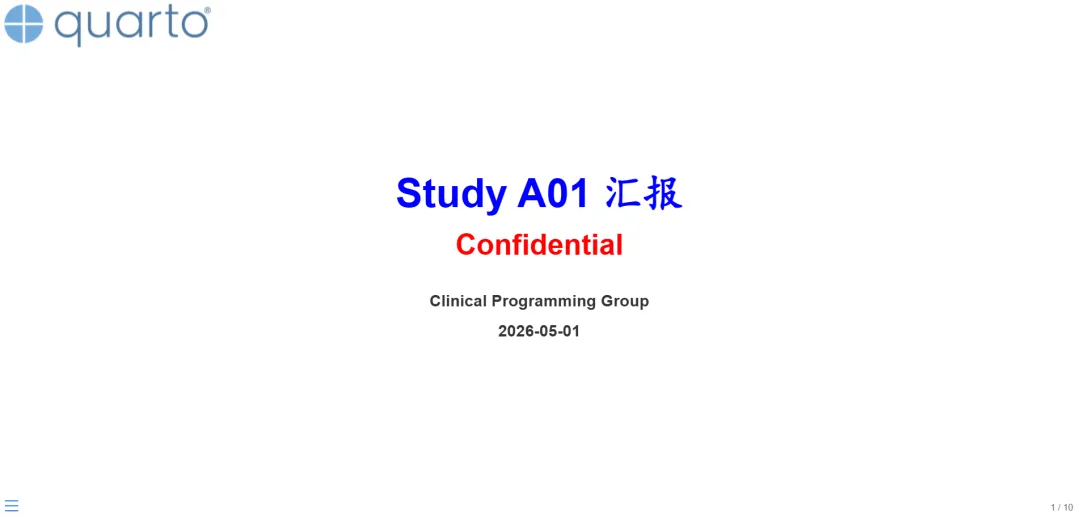
设置presentation的标题,副标题等等,图中左上角使用quarto的logo用来模拟企业自己的商标,标题,副标题的颜色属性是放到custom.css 中设置的,这一点下文再给大家展示。
目录页
## Study A01<br/>- [**受试者分布**]{style="color: blue;"}- ASAS40疗效数据更新- 安全性
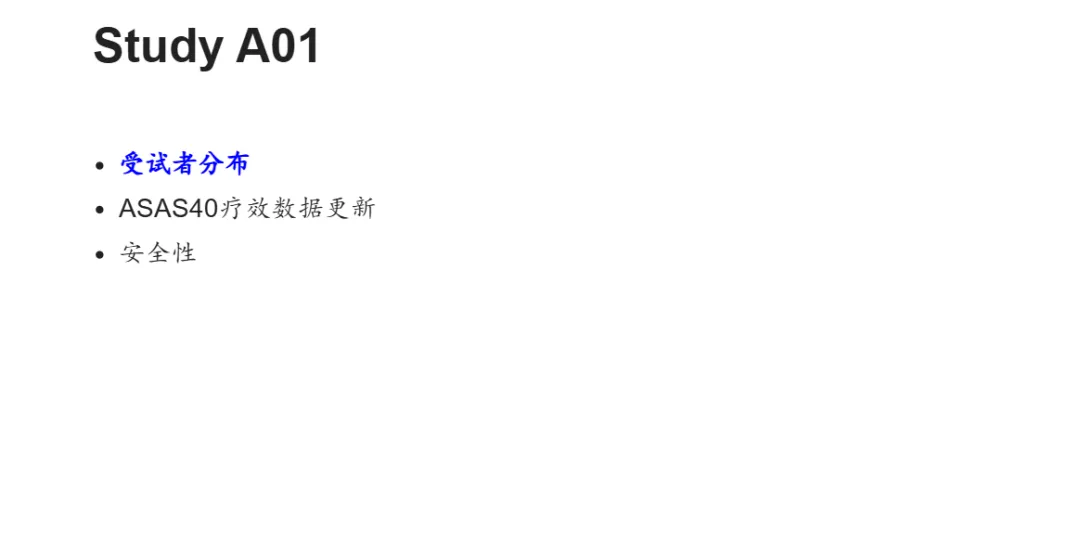
颜色,字体都可以通过style进行自定义。
Table表格页
## Study A01 -- 16周前退出情况library(haven)library(tidyverse)library(rtables)library(tern)library(htmltools)adsl <- read_sas("data/adsl.sas7bdat") %>%filter(ITTFL == "Y") %>%mutate(TRTP = TRT01P, TRTPN = TRT01PN) %>%mutate(randflag = TRUE %>% with_label("Subjects Randomized"),flag3 = (DCS01RS != "") %>% with_label("Discontinued from Loading Period"),DCS01RS = as.factor(ifelse(DCS01RS == "", NA, DCS01RS)),TRTP = forcats::fct_reorder(TRTP, TRTPN))tfl_disp <- basic_table(show_colcounts = TRUE, # 展示big Ninset = 2) %>%split_cols_by("TRTP") %>% #设置列的子分组add_overall_col("Total") %>%count_patients_with_flags("USUBJID",flag_variables = c("randflag"),denom = "N_col",table_names = "count1") %>%count_patients_with_flags("USUBJID",flag_variables = grep("^flag", names(adsl), value = TRUE),var_labels = "Number of Patients",show_labels = "visible",denom = "N_col",) %>%analyze_vars(vars = c("DCS01RS"),.stats = "count_fraction",var_labels = c("Reason for Treatment Discontinuation"),) %>%build_table(adsl, alt_counts_df= adsl)as_html(tfl_disp) %>%tagAppendAttributes(style = "font-size: 0.7em; wdth: 100%;",.cssSelector = "table") %>%tagList()<br/br/> [**A01-XX**]{style="color: red;"} 治疗组,4(2.8%)例受试者(S215004, S217008, S221004, S222003)16周前退出研究。
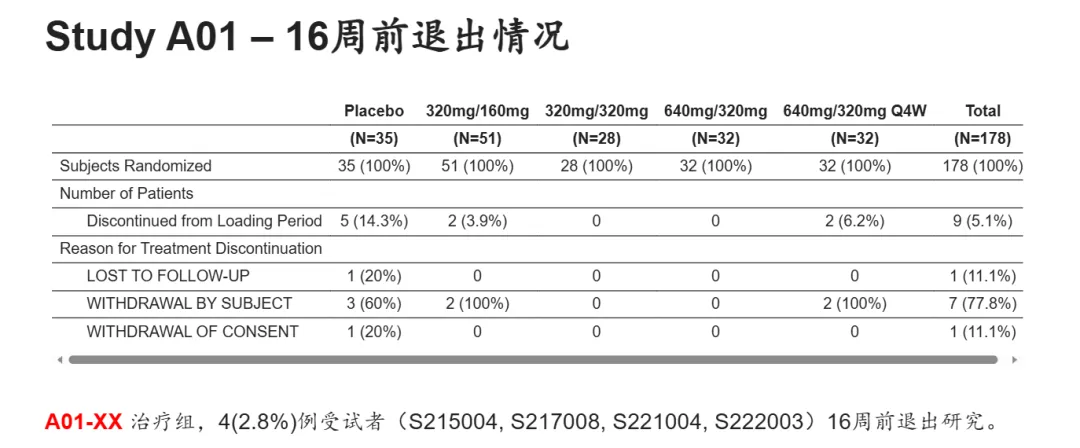
上面的代码就是输出常规的受试者分布表的R代码,rtables和tern package对于输出TLGs非常好用。可以看到上图输出的表格下面有左右滚动条,对于试验前期探索阶段的项目可能有多个组别,这里相比PPT可以很好的适应多列的情况,而不用调整字体。
试验设计页
## Study A01 Design::: {style="height: 150px;"}:::[**Part A**]{style="color: blue;"}::: {style="height: 220px;"}:::[**Part B**]{style="color: blue;"}{.absolute top="100" left="70" width="800" height="300"}{.absolute top="400" left="90" width="750" height="250"}
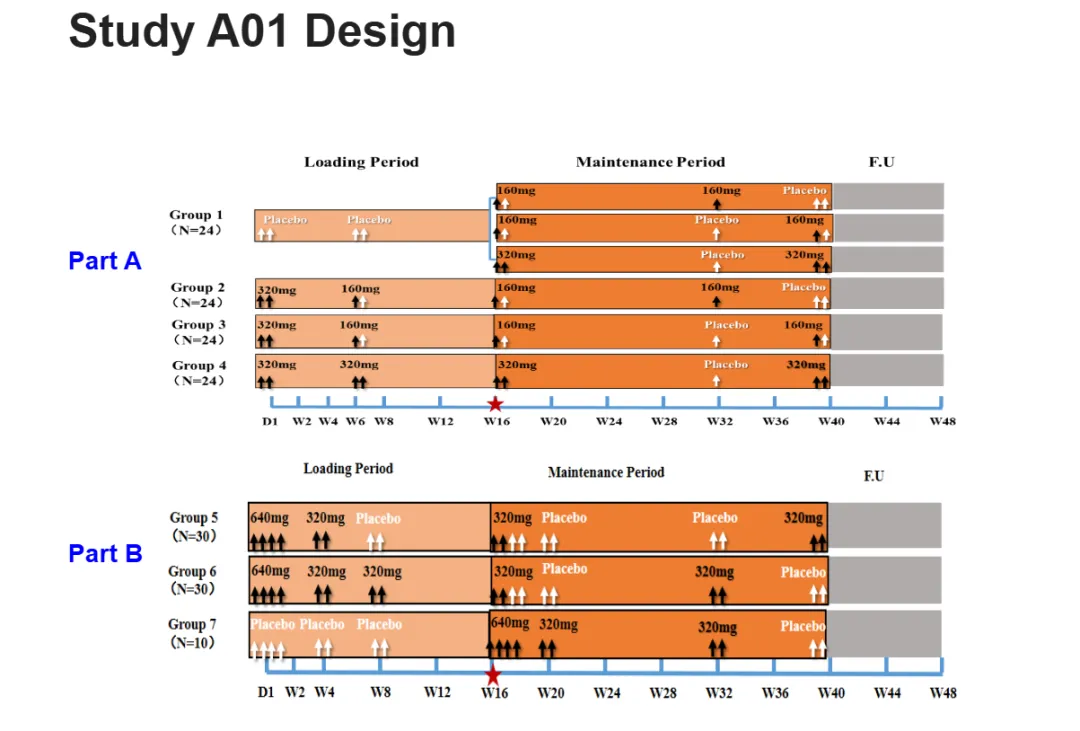
这一页仅是将方案中的试验设计截图放到presentation中,给领导一个印象。疗效指标绘图页
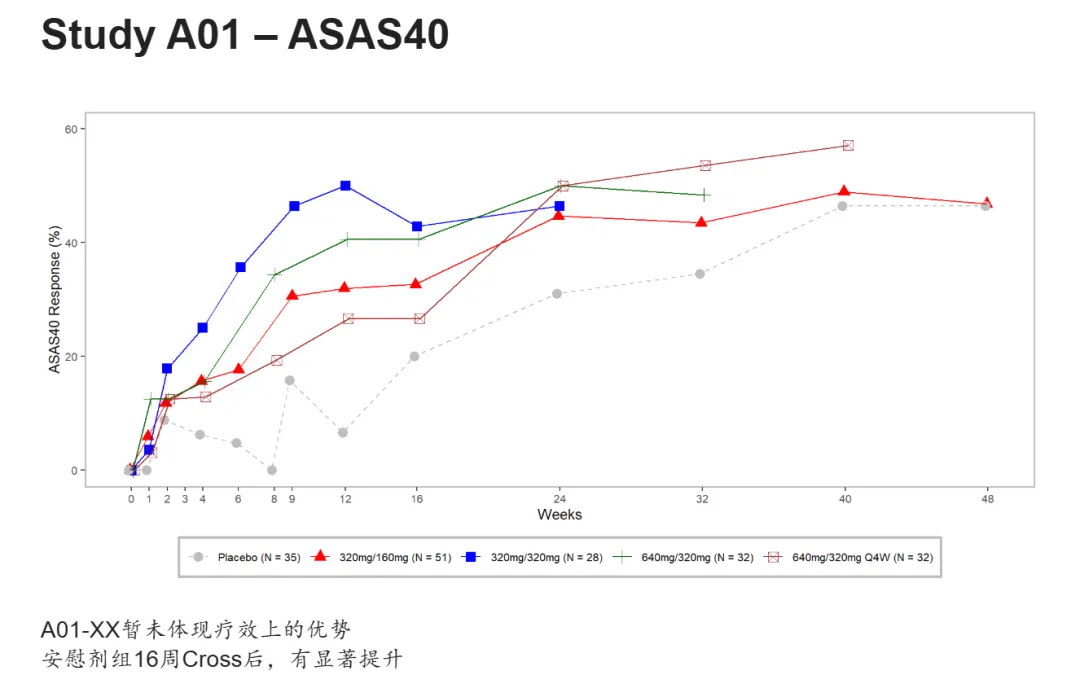
## Study A01 -- ASAS40adsl <- read_sas("data/adsl.sas7bdat") %>%filter(ITTFL == "Y") %>%mutate(TRT01P = forcats::fct_reorder(TRT01P, TRT01PN, min))adqs <- read_sas("data/adqs.sas7bdat") %>%filter(ITTFL == "Y", PARAMCD == "ASAS40", DTYPE == "", ANL01FL == "Y") %>%mutate(AVISIT = forcats::fct_reorder(AVISIT, AVISITN, min),TRT01P = forcats::fct_reorder(TRT01P, TRT01PN, min),AVAL = AVAL*100,)g_lineplot(adqs, adsl, variables = control_lineplot_vars(x = "AVISITN",y = "AVAL",y_unit = NA,group_var = "TRT01P"),ylim = c(0, 60),interval = NULL,col = c("grey","red", "blue", "darkgreen","brown"),mid_point_size = 3,linetype = c("dashed","solid","solid","solid","solid"),y_lab = "ASAS40 Response (%)",y_lab_add_paramcd = FALSE,x_lab = "Weeks",xticks = c(0,1,2,3,4,6,8,9,12,16,24,32,40,48),title = NULL,y_lab_add_unit = FALSE,subtitle_add_paramcd = FALSE,subtitle_add_unit = FALSE)A01-XX暂未体现疗效上的优势 <br/>安慰剂组16周Cross后,有显著提升
安全性指标绘图页
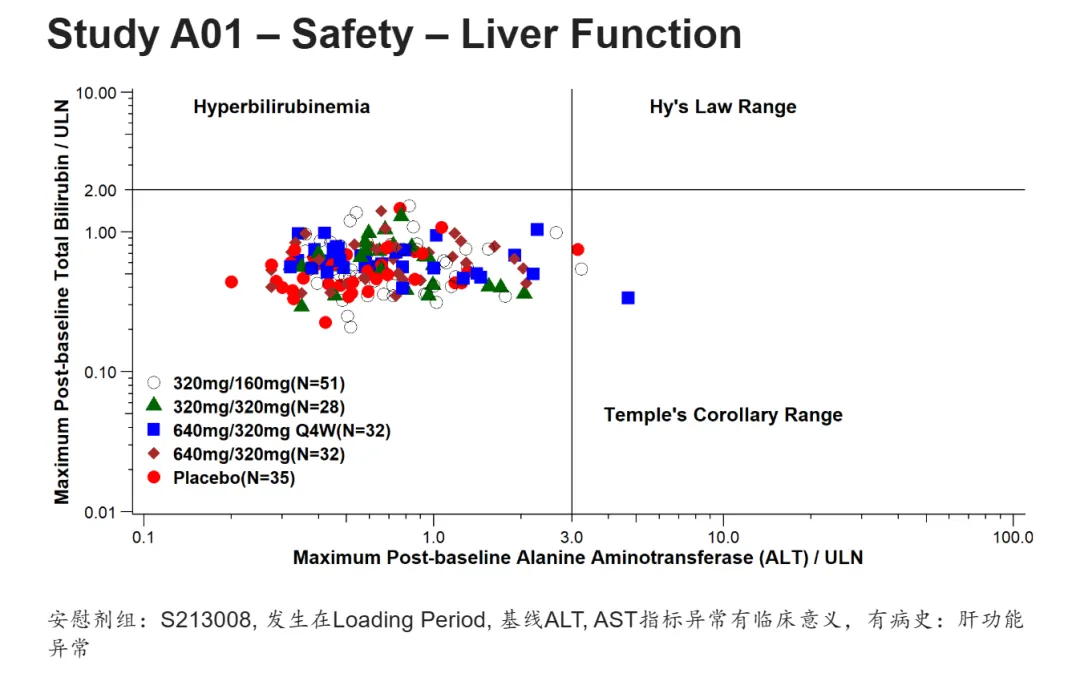
## Study A01 -- Safety -- Liver Functionadsl <- read_sas("data/adsl.sas7bdat") %>%filter(ITTFL == "Y") %>%mutate(TRT01P = forcats::fct_reorder(TRT01P, TRT01PN, min)) %>%group_by(TRT01PN, TRT01P) %>%summarise(bign = n(), .groups = "drop")adlb <- read_sas("data/adlb.sas7bdat") %>%filter(SAFFL == "Y", APERIOD == 1, ABLFL != "Y", PARAMCD %in% c("ALT", "BILI")) %>%mutate(TRT01P = forcats::fct_reorder(TRT01P, TRT01PN, min),) %>%group_by(USUBJID, PARAMCD) %>%summarise(maxaval = max(AVAL),TRT01P = first(TRT01P),TRT01PN = first(TRT01PN),ANRHI = first(ANRHI),.groups = "drop") %>%mutate(aval = maxaval/ANRHI)ana1 <- left_join(adlb, adsl, by = c("TRT01PN", "TRT01P")) %>%pivot_wider(id_cols = c(USUBJID, TRT01PN, TRT01P, bign),names_from = PARAMCD,values_from = aval) %>%mutate(TRT01P = paste0(TRT01P, "(N=", bign,")"))ggplot(ana1, aes(ALT, BILI, color = TRT01P, shape = TRT01P)) +geom_point(size = 4) +geom_vline(aes(xintercept = 3)) +geom_hline(aes(yintercept = 2)) +annotate("text",x = 0.3, y = 8, label = "Hyperbilirubinemia", size=5, fontface = 2) +annotate("text",x = 10, y = 8, label = "Hy's Law Range", size=5, fontface = 2) +annotate("text",x = 10, y = 0.05, label = "Temple's Corollary Range", size=5, fontface = 2) +scale_y_continuous(trans = "log10", breaks = c(0.01, 0.1, 1, 2, 10), limits = c(0.01, 10), expand = c(0.005, 0.005)) +scale_x_continuous(trans = "log10", breaks = c(0.1, 1, 3, 10, 100), limits = c(0.1, 100), expand = c(0.005, 0.005)) +labs(x = "Maximum Post-baseline Alanine Aminotransferase (ALT) / ULN",y = "Maximum Post-baseline Total Bilirubin / ULN") +scale_color_manual(values = c("black", "darkgreen", "blue", "brown", "red")) +scale_shape_manual(values = c("circle open", "triangle", "square", "diamond", "circle")) +theme_classic() +theme(legend.position = c(0.15, 0.2),legend.title = element_blank(),legend.text = element_text(size = 13, face = "bold"),axis.title = element_text(size = 14, face = "bold"),axis.ticks.length = unit(2, "mm"),axis.text.x = element_text(size=12, margin = margin(t = 2, unit = "mm")),axis.text.y = element_text(size=12, margin = margin(r = 2, unit = "mm"))) +annotation_logticks(sides = "bl", outside = TRUE) +coord_cartesian(clip = "off")安慰剂组:S213008, 发生在Loading Period, 基线ALT, AST指标异常有临床意义,有病史:肝功能异常
custom.css
.reveal,.reveal h1,.reveal h2,.reveal h3,.reveal h4,.reveal h5,.reveal h6 {font-family: Arial, "KaiTi", "楷体", "STKaiti", serif !important;}#title-slide h1.title {color: blue !important;font-size: 2.5em !important;}.reveal h2 {font-size: 1.8em !important;}.reveal {font-size: 1.5em !important;}#title-slide p.subtitle,#title-slide .subtitle {color: red !important;font-size: 1.8em !important;font-weight: bold !important;}#title-slide .quarto-title-author-name,#title-slide p.date,#title-slide .date {font-weight: bold !important;color: #333 !important;}
Quarto 支持自定义css格式,比如这里英文使用Arial字体,中文使用楷体,标题页,内容页字体大小,颜色等等。当然还有背景,模板等等大家可以自己探索。
写到最后
完整的presentation已经共享,大家可以浏览(需要梯子):
https://rpubs.com/AQ_LIFE/1430556
https://rpubs.com/AQ_LIFE/1430556
如果需要Quarto完整代码,可以公众号回复:quarto_slides
